

Overview
The Data Catalog shows the structure of a collection: every field that travels with your content, what it means, and how the agent is allowed to use it. Each piece of content (an article, a paper, a product, a support ticket) carries fields like title, author, date, section, or status. The catalog is where you review those fields and tell Raily how to treat each one. This matters because Raily’s search reads the catalog before it answers. A clear description on a field lets the agent filter on it correctly. A missing or vague one means the agent ignores it.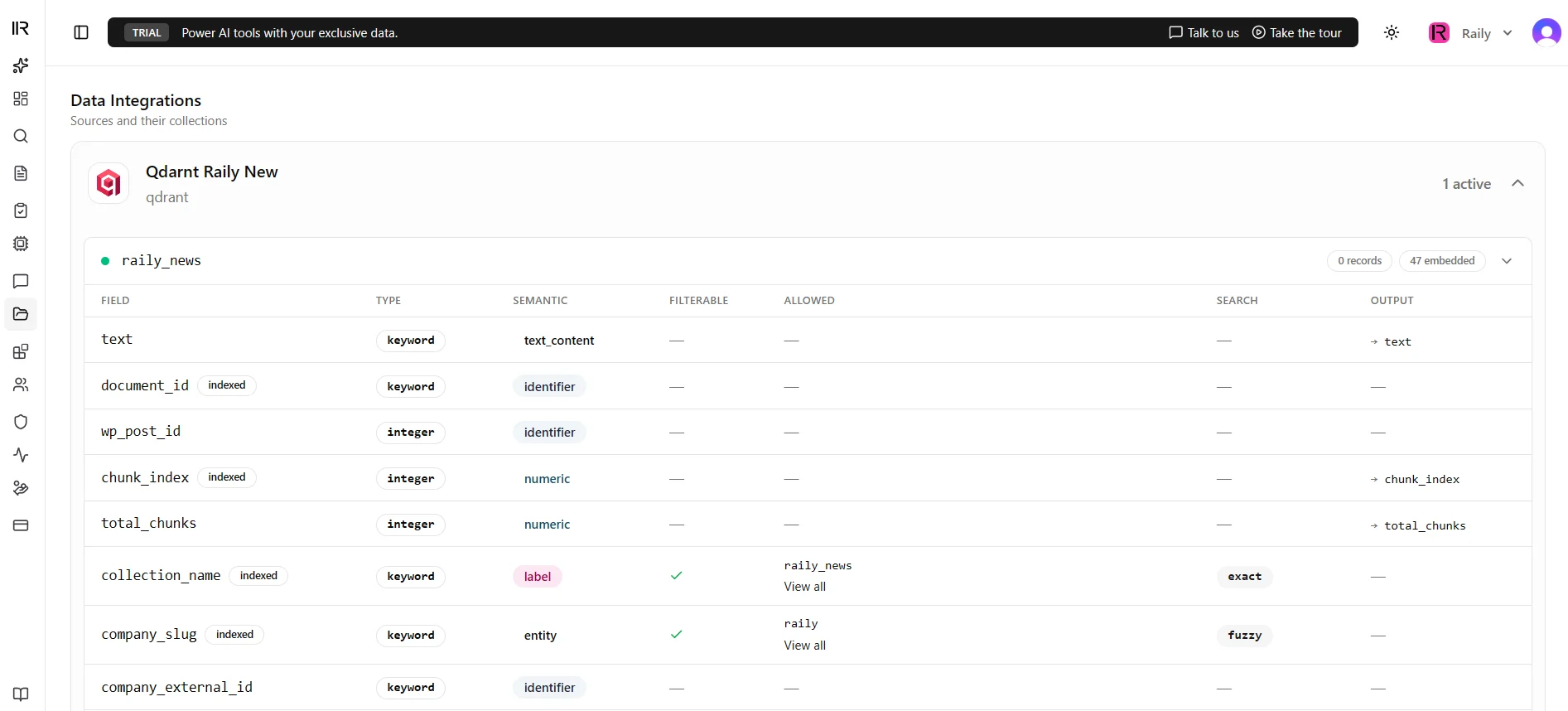
Data Catalog for a collection
What you see
The catalog lists one row per field. For each field you see:- Name - the field as it exists in your content, such as
author,published_at, orsection. - Type - what kind of value it holds: text, number, date, or a fixed set of options.
- Description - a short, plain-language note that tells the agent what the field means and when to use it.
- Filterable - whether the agent can narrow a search using this field.
- Output - whether the field is returned with each result.
- Allowed values - for fields with a fixed set of options, the list of values the field can take.
Field properties
Description
The description is the most important part of a field. The agent reads it to decide when a query should touch that field. Write it the way you would explain the field to a new colleague. For asection field on a news collection:
The newspaper section the article ran in, such as Opinion, Sports, or Business. Filter on this when the reader asks for a specific section.That one line is what turns “show me opinion pieces about the election” into a search scoped to the Opinion section.
Filterable
A filterable field can be used to narrow a search. When a reader asks “articles from last week” or “only papers after 2020”, the agent matches that phrasing to a filterable field and applies it before searching. Turn this on for fields people actually slice by: date, author, section, category, status, content type. Leave it off for free-text fields that no one filters on, like the body of the article.Output
An output field is returned with each search result, so the calling application can show it. Title, author, date, and a link are typical output fields. A reader scanning results sees these without opening the source. A field can be filterable, output, both, or neither. A date is usually both: people filter by it and want to see it. An internal scoring field might be filterable but hidden from output.Allowed values
Some fields hold one of a fixed set of options. Astatus field might only ever be Draft, Review, or Published. Listing those values does two things:
- The agent matches loose phrasing to the right value (“unpublished drafts” maps to
Draft). - Each value can show as a colored badge in results, so a reader spots the status at a glance.
Published, gray for Draft) so the color carries meaning.
Examples
A news collection might catalog fields like this:
A research collection might look like this instead:
The fields differ per collection. The catalog adapts to whatever your content provides.
Why it matters
The catalog is how the agent learns your data. When search results are too broad, miss an obvious filter, or never surface a field people ask for, the fix is almost always here:- A filter never fires? Check the field is marked Filterable and has a clear description.
- A value comes back as raw text instead of a badge? Set its Allowed values and tone.
- A reader can’t see the date or author in results? Turn on Output for that field.
Next Steps
Agentic Layer
See how filters and ranking use these fields at search time
Vector Store
Connect a vector store and index content for semantic search